
The role of data extraction from public websites and competitors plays a major role in making future-proof decisions for modern-day brands and enterprises. Today, most of the enterprises use some form of web data extraction to drive market research, competitive intelligence, and operational decision-making.
From tracking competitor prices in real time to compiling structured data for artificial intelligence models, web scraping has evolved into an enterprise-grade technology that supports industries from finance to travel. Businesses leveraging large-scale web crawling report faster decision cycles compared to those relying solely on manual data collection.
This guide is designed for business owners, product managers, analysts, and technical teams who want a clear, practical, and technically accurate understanding of web scraping.
We’ll start with the basics and progress to advanced, business-scale strategies.
What is Web Scraping?
Web scraping is the process of using automated scripts or tools—known as web scrapers to extract specific pieces of information from a web page and transform it into a structured, usable format like CSV, JSON, or a database entry.
For example, imagine you need a daily updated list of real estate listings from multiple property sites. Instead of manually copying details into a spreadsheet, a scraper can crawl these sites, identify the relevant HTML elements (like property name, price, location), and export them as structured data.
In more technical terms, scrapers work by sending HTTP requests to a server, downloading the page’s HTML or JSON response, and parsing it to retrieve the target data. The result is web-scraped data that can feed into analytics systems, dashboards, or machine learning pipelines.
Web Scraping Use Cases for Businesses
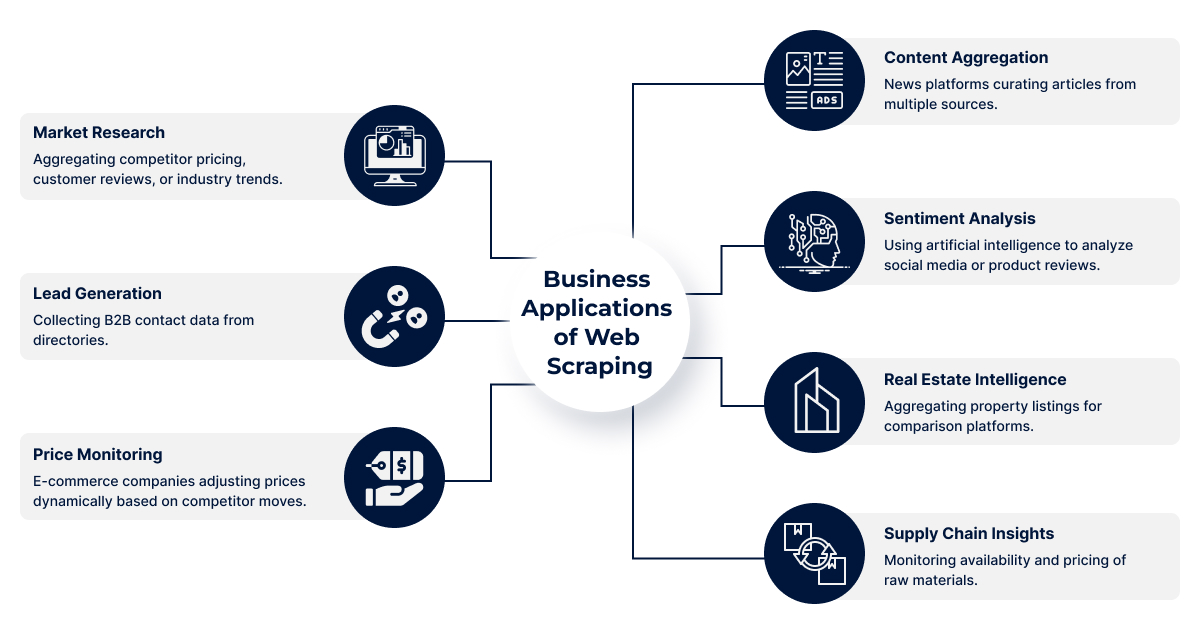
Businesses adopt web data extraction because it allows them to collect and process large amounts of publicly available data faster than manual research. This data fuels strategic decisions, improves efficiency, and provides a competitive edge. Here’s how different industries apply it:
1. Market Research
Market research through web scraping involves collecting competitor pricing, customer feedback, and emerging industry trends. This enables businesses to spot opportunities, identify gaps, and plan future strategies. Companies can monitor how products are performing and forecast demand with greater accuracy.
- Compare competitor products and pricing instantly
- Track emerging market trends
- Analyze customer reviews for product feedback
- Discover untapped market opportunities
- Forecast industry changes early
2. Lead Generation
Lead generation becomes more effective when businesses automate the process of collecting B2B contact data from online directories, LinkedIn profiles, and company websites. This creates a steady pipeline of qualified prospects without relying solely on manual entry.
- Extract contact names, emails, and phone numbers
- Target decision-makers in specific industries
- Save time on manual research
- Build segmented prospect lists for campaigns
- Improve outreach efficiency and personalization
3. Price Monitoring
E-commerce companies use scraping tools to track competitor pricing and make real-time adjustments to their own prices. This ensures they remain competitive without sacrificing profit margins.
- Monitor competitor discounts and offers
- Identify optimal pricing strategies
- Track seasonal price fluctuations
- Respond quickly to market changes
- Avoid overpricing or underpricing products
4. Content Aggregation
News websites, blogs, and research portals aggregate articles and posts from multiple trusted sources. Web scraping makes this process seamless and timely, ensuring that fresh content is always available for readers.
- Pull latest news from multiple sources
- Maintain a constant content stream
- Aggregate niche-specific blog posts
- Curate industry reports and case studies
- Keep users engaged with updated information
5. Sentiment Analysis
By collecting reviews, tweets, and forum discussions, businesses can analyze public sentiment toward their products or brand. Using AI, this data helps in shaping marketing strategies and customer service improvements.
- Extract social media mentions
- Monitor product review sentiment
- Identify recurring customer complaints
- Track brand perception over time
- Adjust campaigns based on feedback trends
6. Real Estate Intelligence
Real estate companies scrape property listing sites to compare market prices, locations, and amenities. This benefits agencies, investors, and buyers by providing accurate and updated property insights.
- Track property price changes
- Monitor new listings instantly
- Compare locations and amenities
- Analyze rental vs. purchase trends
- Identify investment opportunities early
Supply Chain Insights
Scraping supplier websites helps businesses monitor availability, prices, and delivery timelines for raw materials or products. This supports better procurement decisions and reduces risks.
- Track inventory availability
- Compare supplier pricing
- Monitor shipping timelines
- Detect supply chain disruptions
- Negotiate better deals with suppliers
Statistically, McKinsey reports that data-driven companies are 23 times more likely to acquire customers and 6 times more likely to retain them—proving the ROI of accurate, timely data.
Different Ways of Web Scraping
There are several ways to perform web scraping, and each method is suited for specific project sizes, goals, and technical capabilities. Choosing the right approach depends on your data needs, budget, and technical resources. Here’s a breakdown of the main methods:
1. Manual Web Scraping
This involves copying and pasting data directly from a website into your local file or spreadsheet. It’s the most basic form of scraping and doesn’t require any tools or coding skills. While easy to start with, it’s slow and only practical for small, one-off tasks.
- Best for small, simple, or urgent data collection.
- No technical skills or tools required.
- Not scalable for large datasets.
2. Browser Extensions
Extensions like Web Scraper.io or Data Miner allow users to click and select elements on a web page to extract data. These are user-friendly and great for beginners. However, they are limited in automation, customization, and the amount of data they can handle efficiently.
- Easy setup with no coding required.
- Suitable for low-volume projects.
- Limited flexibility and scalability.
3. Automation Scripts
This method uses programming languages like Python or JavaScript, along with libraries such as BeautifulSoup, Scrapy, or Puppeteer. It allows for flexible and large-scale data extraction, enabling custom scraping rules, scheduling, and automated workflows.
- Handles complex and large-scale scraping.
- Fully customizable to project needs.
- Requires coding knowledge and maintenance.
4. Enterprise-Level Web Scraping Solution
These are fully tailored scraping platforms built for businesses with ongoing, large-scale data requirements. They often include in-house crawlers, anti-blocking measures, real-time delivery, and seamless integration with analytics or business intelligence tools.
- Designed for high-volume, ongoing needs.
- Integrates directly with business systems.
- Fully legally compliant data acquisition
Manual Web Scraping vs Web Scraping Services
| Feature | Manual Copy-Paste | Browser Extension | Professional Service |
|---|---|---|---|
| Speed | Very slow | Moderate | High |
| Data Volume | Very low | Medium | Unlimited |
| Accuracy | Human error prone | Moderate | High |
| Customization | None | Limited | Full |
| Maintenance | Not applicable | User updates | Fully managed |
| Compliance | User handles | User handles | Service ensures |
| Best For | One-off tasks | Small projects | Large-scale, ongoing |
Manual Web Scraping
- Handles small datasets
- Runs locally or via a simple cloud tool
- Limited scheduling and error handling
Enterprise-Grade Web Scraping Services
- Millions of records, multiple sources
- Real-time extraction and delivery
- Custom anti-captcha, IP rotation, distributed crawling
- Data normalization and enrichment pipelines
Types of Web Scraping
1. HTML Parsing
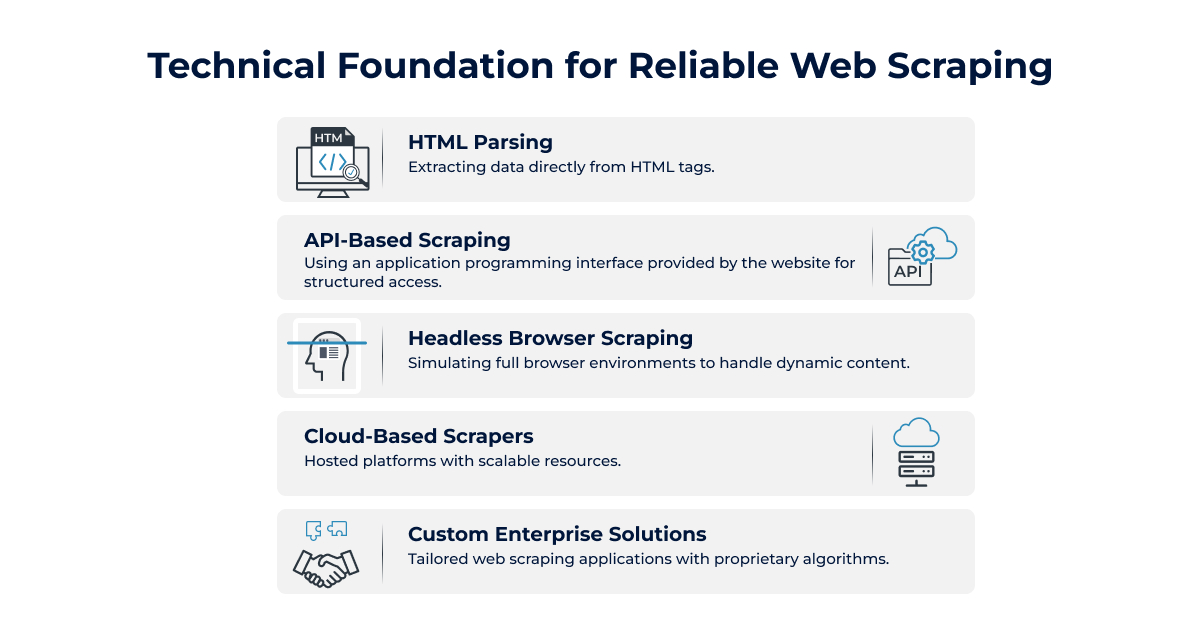
This method involves pulling data directly from the HTML code of a webpage. It works by identifying and extracting specific tags or elements such as headings, paragraphs, or tables. HTML parsing is often used when data is static and the structure of the website remains consistent.
- Extracts data from HTML tags
- Best for static, structured websites
- Requires HTML/CSS knowledge
2. API-Based Scraping
Many websites provide APIs to allow structured data access without directly scraping HTML. This method is cleaner, faster, and less prone to breaking if the website layout changes. APIs return data in formats like JSON or XML, making it easy to process.
- Uses official APIs for data retrieval
- Returns structured formats (JSON, XML)
- Reliable and less affected by design changes
3. Headless Browser Scraping
Some sites load content dynamically through JavaScript, so HTML alone isn’t enough. Headless browsers like Selenium or Puppeteer simulate a full browser experience to load and capture this dynamic data.
- Handles JavaScript-heavy websites
- Simulates real user browsing
- Ideal for interactive or dynamic pages
4. Cloud-Based Scrapers
These are hosted scraping platforms that run on cloud servers, offering better scalability and speed. Businesses can manage large-scale scraping tasks without investing in local hardware or maintenance.
- Runs on cloud infrastructure
- Scales easily for big projects
- No local setup required
5. Custom Enterprise Solutions
Large organizations often need highly tailored scraping tools to meet specific business goals. These solutions may use proprietary algorithms, integrate with internal systems, and handle massive datasets efficiently.
- Fully customized for business needs
- Can process huge amounts of data
- Offers advanced automation and integration
Key Components of a Web Scraping System
1. Crawler – Navigates across URLs.
The crawler is the part of a web scraping system that automatically moves through different web pages by following links or a set list of URLs. It ensures you can reach and scan all relevant sources for the data you need.
2. Extractor – Pulls target data fields.
Once a page is reached, the extractor identifies and retrieves the specific pieces of data you’re interested in, such as product names, prices, or contact details. This ensures only the relevant and valuable information is captured from each page.
3. Parser – Converts unstructured HTML into structured data.
A parser takes the raw HTML code from a webpage and organizes it into a structured format, such as tables, CSV files, or JSON. This step makes the extracted data easy to read, process, and analyze later.
4. Storage Layer – Databases, cloud buckets, or flat files.
After extraction, data is stored securely in a chosen location. This could be a database for ongoing use, a cloud storage bucket for easy access, or simple flat files for quick downloads and offline use.
5. Quality Control Module – Deduplication, validation.
This module ensures that your scraped data is accurate, consistent, and free from duplicates. It checks for errors, validates formats, and confirms that the information meets the expected quality standards before it’s used.
6. Compliance Filters – Ensuring legal use.
Compliance filters help ensure that all scraping activities follow legal guidelines and ethical standards. They can block restricted domains, respect robots.txt files, and manage rate limits to prevent misuse or violations of terms of service.
Types of Web Scraping Tools and Software
1. Open-source
Open-source web scraping tools are free and community-supported, making them flexible for developers who want to customize their scraping logic. These tools often require programming skills and offer robust libraries for parsing HTML, handling requests, and managing data extraction at scale. They are ideal for businesses with internal developer teams who need full control over their scraping pipelines.
Examples:
- BeautifulSoup – Python library for parsing HTML/XML.
- Scrapy – Fast and scalable Python framework for large-scale scraping.
- Puppeteer – Node.js library for browser automation.
- Selenium – Browser automation tool supporting multiple languages.
- Cheerio – Fast, jQuery-like HTML parser for Node.js.
2. Paid Tools
Paid scraping tools are designed for businesses that need quick deployment without heavy coding. They usually come with user-friendly interfaces, automation features, and support services. These platforms often offer pre-built connectors, scheduling options, and integrations to streamline large-scale data collection while ensuring compliance. They’re suited for companies that prioritize speed and ease over deep technical customization.
Examples:
- Octoparse – Visual scraping tool with cloud storage.
- ParseHub – Multi-page and dynamic content scraper.
- io – Data extraction platform with API access.
- Content Grabber – Enterprise-grade web automation tool.
- WebHarvy – Point-and-click pattern-based scraper.
3. Cloud Platforms
Cloud-based scraping platforms eliminate the need for local infrastructure, allowing data collection to run entirely online. These platforms provide APIs, serverless execution, and IP rotation to handle large-scale operations without worrying about hardware. They are especially useful for businesses needing 24/7 scraping with minimal downtime, plus scalability to handle traffic spikes.
Examples:
- Apify – Serverless automation and scraping workflows.
- Bright Data – Large proxy network with data services.
- Diffbot – AI-powered web data extraction API.
- Dataflow Kit – Cloud-based scraper with scheduling.
- SerpApi – Real-time search engine results scraping API.
4. Custom Solutions
Custom-built scraping solutions are tailored for specific business goals, data structures, and compliance requirements. They are typically developed by in-house or outsourced expert teams to integrate directly with internal systems. These solutions prioritize scalability, speed, and security, often including automation, machine learning, and legal compliance frameworks. They’re best for enterprises with unique data needs that off-the-shelf tools cannot address.
Examples:
- Proprietary Python-based Scraper – Built with Flask/Django integration.
- Custom Node.js Crawler – Designed for dynamic JS-heavy sites.
- Java-based Scraping Framework – High-performance data pipelines.
- Enterprise API Extractor – Tailored for structured JSON/XML feeds.
- Industry-specific Scraper – Customized for retail, finance, or real estate.
Applications of Web Scraping Across Industries
1. E-commerce: Competitor monitoring
E-commerce businesses use web scraping to track competitor prices, promotions, and product availability. This data helps them adjust pricing strategies, identify trending products, and stay competitive in a dynamic market. Automated scraping saves time compared to manual tracking, allowing teams to focus on strategy and growth.
2. Finance: Stock prices, news feeds
In finance, real-time data is critical. Web scraping can collect stock prices, exchange rates, and news updates from multiple sources. Investors and analysts use this information to make quick decisions, identify patterns, and predict market trends. Timely, accurate data often means the difference between profit and loss.
3. Real Estate: Aggregating listings
Real estate professionals scrape data from property listing sites to centralize information on prices, locations, features, and availability. This creates a single, searchable database for analysis and marketing. Aggregated listings help agents and buyers compare options quickly and spot undervalued properties or emerging market trends.
4. Travel: Price comparison
Travel agencies and booking platforms scrape airfare, hotel, and rental prices from different providers to offer the best deals. This allows them to display competitive pricing to customers, increase booking conversions, and react to market changes instantly. Accurate data ensures they remain attractive to price-conscious travelers.
5. Research: Academic datasets
Researchers use web scraping to gather large datasets from online publications, social media, or government websites. This enables them to analyze trends, test hypotheses, and validate findings. Automating data collection not only reduces manual work but also improves accuracy, ensuring reliable results for academic and scientific studies.
Web Scraping Process (Step-by-Step)
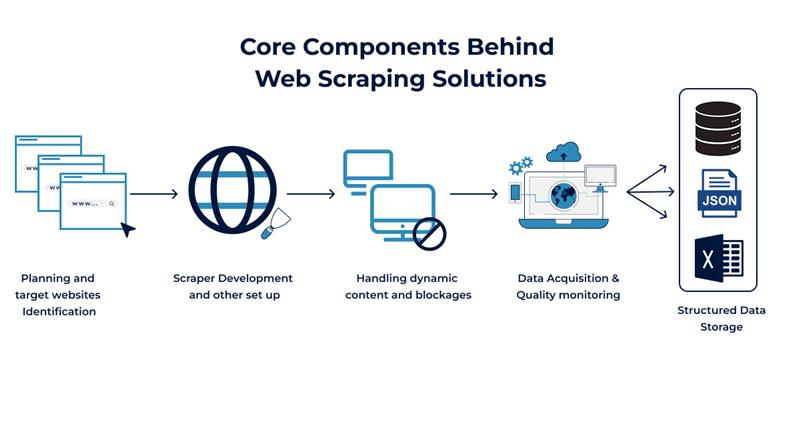
Web scraping follows a systematic approach to ensure that the data collected is accurate, relevant, and usable. While businesses don’t usually perform this themselves, understanding the process helps them know what to expect when working with a service provider.
1. Define objectives and data fields
Every project starts with clarity on what needs to be achieved and the type of data required. This step ensures there is no ambiguity during collection.
- Identify the exact business goal (e.g., price monitoring, lead generation).
- Decide on the type of data to be collected (text, images, prices, product specs, etc.)
- Set parameters for data quality and update frequency.
2. Analyze target site structure
Before any scraping begins, the site’s structure is reviewed to understand how information is organized.
- Study HTML layout, tags, and patterns where data resides.
- Check if the website uses dynamic content (JavaScript, AJAX).
- Identify pagination or filtering methods.
3. Build or configure web scrapers
The scraper is the tool that will perform the extraction. It’s built or configured according to the site’s structure and the project’s requirements.
- Use custom-built scripts or professional scraping tools.
- Define extraction logic based on HTML patterns.
- Ensure adaptability for site updates.
4. Implement anti-blocking mechanisms
Many sites have protections to prevent automated access. A professional setup addresses these challenges.
- Rotate IP addresses or use proxy networks.
- Manage request frequency to avoid triggering rate limits.
- Simulate human-like browsing patterns.
5. Extract, parse, and clean data
Once data is collected, it needs to be processed so it’s usable and free from errors.
- Convert raw HTML into structured formats like CSV or JSON.
- Remove duplicate or irrelevant entries.
- Standardize data formats for consistency.
6. Store in desired format
The cleaned data is saved in a format compatible with the client’s systems.
- Store in CSV, Excel, JSON, or databases.
- Ensure secure and accessible storage.
- Organize files for easy retrieval.
7. Schedule and monitor for changes
Web data changes frequently, so regular updates are important for accuracy.
- Set automated schedules for repeated scraping.
- Monitor websites for structure changes.
- Adjust scraper settings when sites update.
Advantages of Web Scraping for Businesses
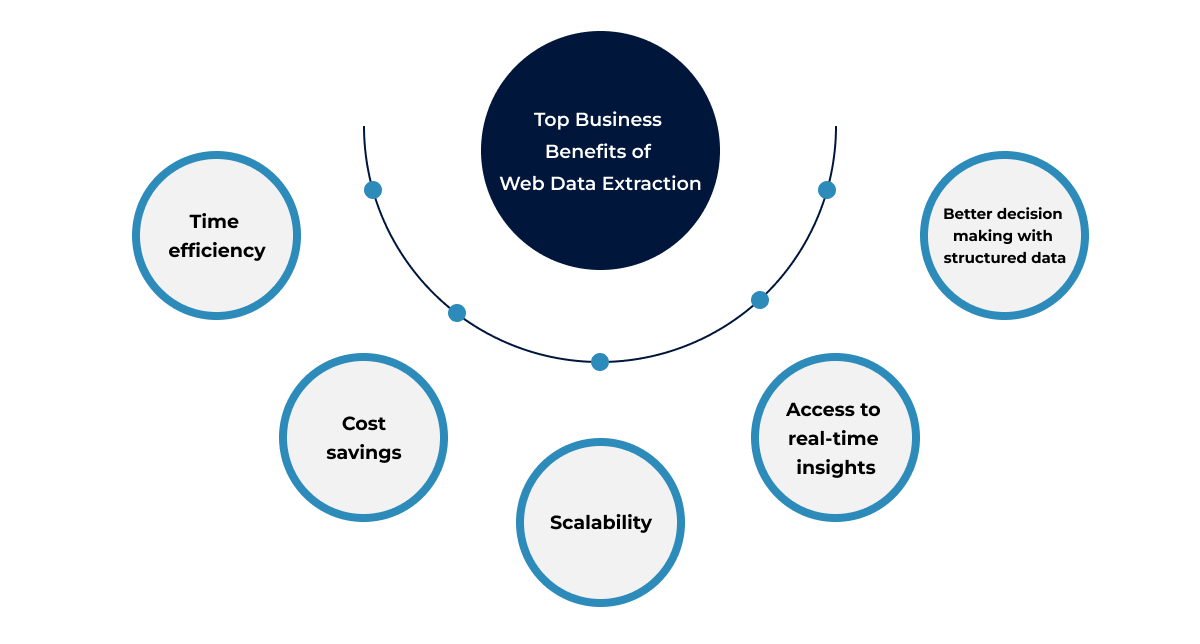
1. Time efficiency
Web scraping automates the process of collecting large amounts of data, saving businesses hours or even days compared to manual research. This allows teams to focus more on analysis rather than data gathering, speeding up workflows and improving productivity.
- Collects large datasets in minutes
- Eliminates manual copy-paste work
- Frees teams for higher-value tasks
2. Cost savings
By replacing manual data collection with automated scraping, businesses reduce the need for large data-entry teams or expensive research services. This results in significant operational cost reductions over time while improving accuracy.
- Lowers labor costs
- Reduces dependency on third-party data providers
- Minimizes human errors in data entry
3. Scalability
Once set up, web scraping tools can handle growing data needs without a major increase in resources or expenses. Businesses can scrape data from multiple sources simultaneously, regardless of size or frequency.
- Handles large-scale data extraction easily
- Grows with business demands
- Supports multiple websites at once
4. Access to real-time insights
Web scraping can be scheduled to run at regular intervals, ensuring businesses always have fresh, up-to-date information. This is critical for industries where market conditions and trends change quickly.
- Enables timely market monitoring
- Keeps pricing and product data current
- Helps track competitor updates instantly
5. Better decision-making with structured data
Scraped data can be organized into a structured format like spreadsheets or databases, making it easier to analyze and use for business strategies. Well-structured data leads to more accurate, data-driven decisions.
- Easier integration with analytics tools
- Improves reporting accuracy
- Supports informed strategic planning
How Much Do Web Scraping Services Cost & Factors Affecting Pricing
1. Data volume
The amount of data you need to extract plays a major role in pricing. Larger datasets require more time, processing power, and storage. Whether it’s thousands or millions of records, higher data volume often means more resources and effort from the scraping team.
2. Complexity of the site
Websites vary in design and structure. Some have simple HTML layouts, while others use dynamic content, JavaScript, or heavy security measures. Complex sites require more advanced scraping techniques and testing, which can influence the total cost of the service.
3. Frequency of scraping
The more often you need updated data, the more frequently scraping tasks must be scheduled. Daily, weekly, or real-time scraping requires consistent server usage, monitoring, and automation, which can add to the workload for the service provider.
4. Compliance requirements
Following legal, ethical, and compliance rules takes extra attention. Ensuring scraping activities comply with terms of service, GDPR, or other regulations often requires additional checks, secure handling of data, and documentation, which can affect the service cost.
Common Challenges in Web Scraping and How to Overcome Them
1. CAPTCHAs
Many websites use CAPTCHAs to block automated bots, making it difficult for businesses to extract data efficiently. These puzzles require human-like interactions to solve, which slows down scraping processes and affects data accuracy.
Solutions:
- Use advanced CAPTCHA-solving services.
- Employ AI-based scraping tools with human-like behavior.
2. IP Blocking
Frequent requests from the same IP address can trigger IP blocking, preventing access to the target site entirely. This often happens when scraping large volumes of data quickly.
Solutions:
- Implement professional IP rotation services.
- Use a global proxy network for diversified access.
3. Dynamic Content
Websites with JavaScript-heavy content load data dynamically, meaning traditional scrapers often miss key information. Without the right setup, your data extraction will be incomplete.
Solutions:
- Use headless browsers for rendering content.
- Integrate APIs where available for structured data access.
4. Legal Restrictions
Data scraping must comply with laws like GDPR, CCPA, and website terms of service. Failing to follow regulations can lead to legal action or reputational damage.
Solutions:
- Work with compliance-focused scraping providers, like RDS Data
- Get legal review for your data usage policies.
Outsourcing Web Scraping to RDS Data
Outsourcing web scraping services to RDS Data means you get expert-driven, compliant, and high-quality data without the hassle of building in-house capabilities. With over 35 years of experience, our in-house team uses proprietary software to deliver end-to-end data solutions—from engineering to AI/ML analysis—ensuring accuracy, speed, and scalability.
Our Solutions Include:
- Custom Data Extraction: Tailored scraping solutions for your unique business requirements.
- Proprietary Tools: Faster, more accurate data with our in-house software.
- Full-Service Delivery: From data engineering to AI/ML-ready datasets.
- Compliance Assurance: All projects follow global data privacy regulations.
Key Takeaways
- Web scraping transforms unstructured web page data into actionable insights.
- Multiple approaches exist—from manual to enterprise-grade.
- Legal compliance and technical robustness are critical.
Frequently Asked Questions
Q1. Can web scraping extract data from any website?
Q2. What is the difference between scraping and crawling?
Q3. How often should I scrape data?
Q4. Can scraping be done in real time?
Q5. Is API scraping better than HTML scraping?
Q6. How do scrapers work with dynamic pages?
Q7. What’s the largest dataset you can scrape?
Q8. Can scraped data feed into AI models?
Q9. How to ensure scraped data is accurate?
Q10. Is manual scraping still relevant?
Tired of broken scrapers and messy data?
Let us handle the complexity while you focus on insights.