

A practical guide to ingestion, data quality, transformation, modeling, monitoring, security, and scale
Introduction
An e-commerce business rarely keeps all its data in one system. An order may start in the online store, the payment may be handled by a separate provider, inventory may be updated in an ERP, and customer activity may be recorded in a CRM. Marketing and shipping platforms add another layer of information.
That separation is useful for day-to-day operations, but it creates a problem for analytics. The same customer, order, or product can have different identifiers or statuses in different systems. Reports can then disagree, inventory numbers can lag reality, and teams spend time reconciling data instead of using it.
A data pipeline connects these systems and moves the information into an analytical destination such as a data warehouse or lakehouse. The pipeline does more than copy records. It validates incoming data, applies business rules, standardizes formats, handles failures, and keeps track of what was processed.
This article walks through a practical e-commerce pipeline, from source discovery and ingestion to transformation, data modeling, loading, observability, recovery, security, and scale.
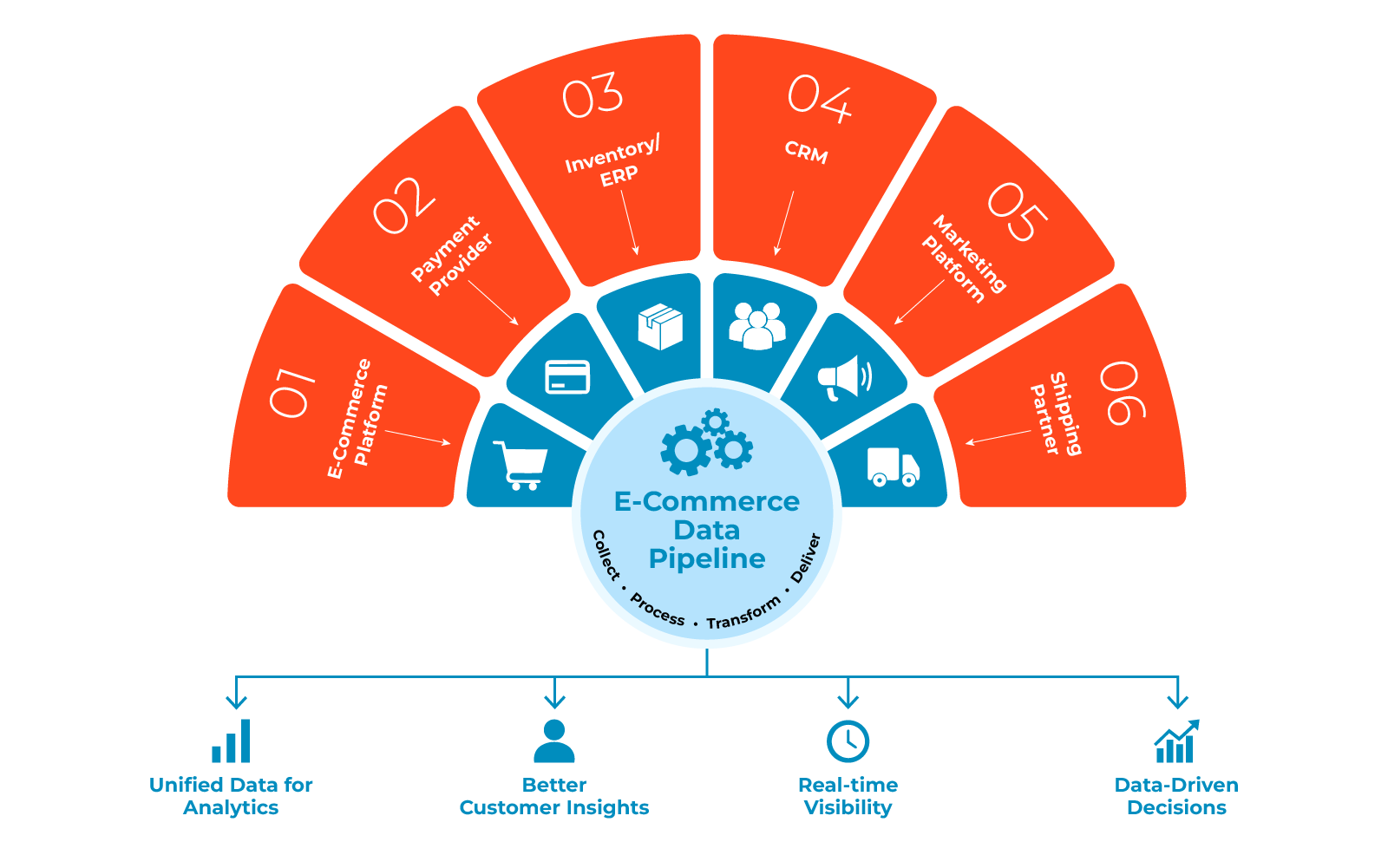
E-Commerce Data Pipeline Architecture
A practical pipeline is easier to operate when each stage has a clear responsibility. A typical flow looks like this:
- Source systems: commerce platforms, marketplaces, payment providers, CRM, ERP, warehouse systems, and marketing platforms.
- Ingestion: APIs, webhooks, scheduled extracts, incremental reads, change data capture (CDC), or event streams.
- Raw or staging layer: the landing area where source records are retained in their incoming form.
- Validation: checks for schema, required fields, duplicates, relationships, and business rules.
- Transformation: standardization, deduplication, enrichment, and business calculations.
- Curated data: trusted fact and dimension datasets prepared for analysis.
- Warehouse or Lakehouse: the storage and query layer used by analytical workloads.
- BI and analytics: dashboards, reports, forecasting, customer analysis, and operational views.
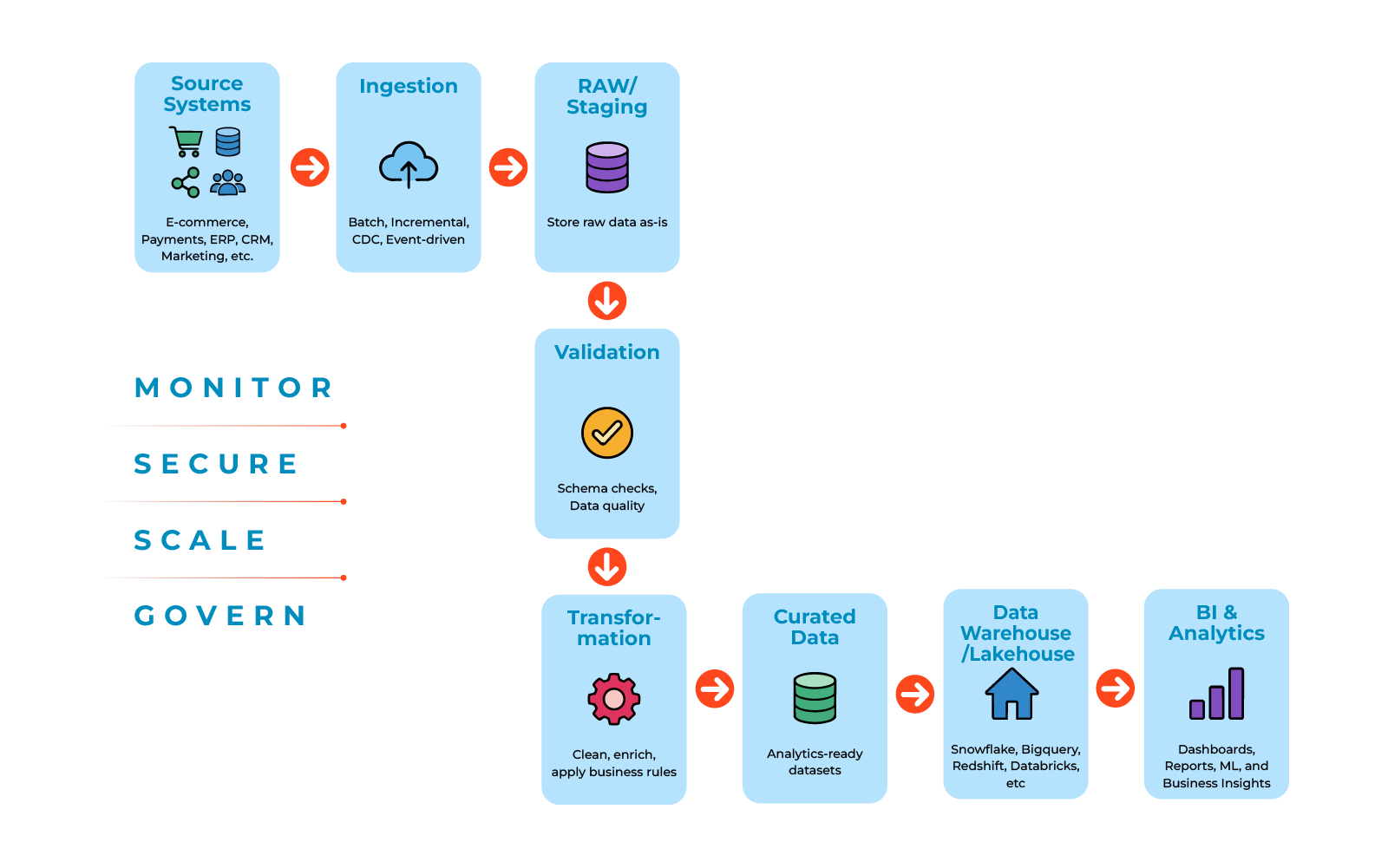
Keeping these stages separate makes troubleshooting much easier. If a business rule changes later, the team can reprocess the retained source data rather than asking the operational system for the same history again.
What Is an E-Commerce Data Pipeline?
An e-commerce data pipeline is an automated path that moves business information from operational systems into a place where it can be analyzed. It may run on a schedule, respond to events, or combine both approaches.
Common data flowing through the pipeline includes:
- Orders and customer details from commerce platforms
- Product and inventory information from ERP or warehouse systems
- Payment events and transaction status from payment providers
- Customer interactions from CRM systems
- Visits, campaigns, and conversion data from analytics and marketing tools
After ingestion, the pipeline checks and reshapes the records before publishing them to the analytical layer.
Typical business uses include inventory visibility, order and revenue reporting, Customer 360 analysis, product performance, marketing attribution, demand planning, and returns or refund analysis.
Not every dataset needs the same freshness. An order-status event may need near-real-time processing, while a financial report may be perfectly suitable for an hourly or daily batch run.
ETL vs. ELT
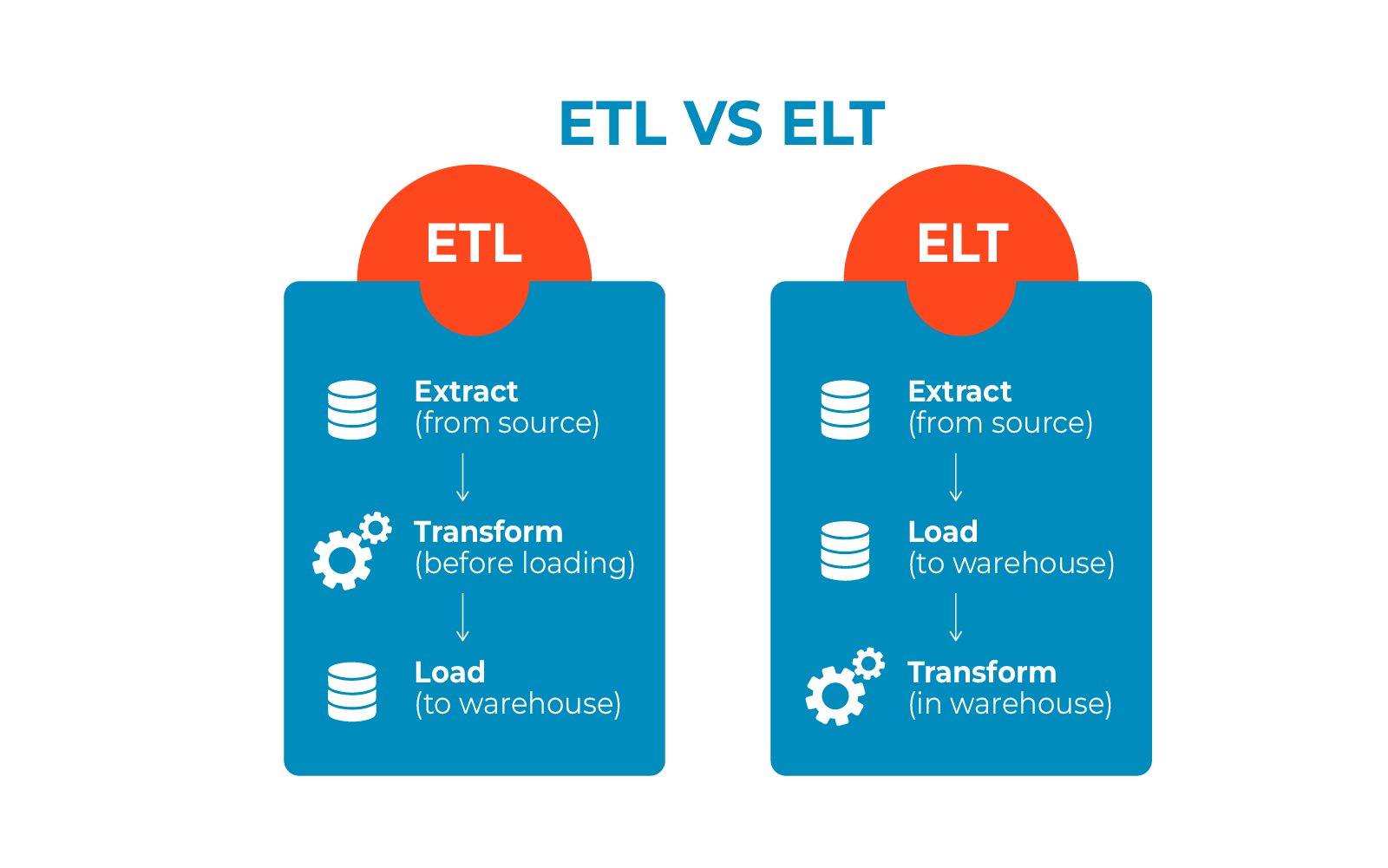
ETL and ELT are two common ways to organize transformation work.
ETL means extract, transform, then load. Data is cleaned and reshaped before it reaches the analytical destination. ELT means extract, load, then transform. The source data is loaded first, and the heavier transformation work happens in the warehouse or lakehouse.
In practice, an e-commerce platform may use both patterns. Basic validation, filtering, and security checks can happen close to ingestion, while larger business transformations run where analytical compute is available.
| Aspect | ETL | ELT |
|---|---|---|
| Where transformation happens | Before loading | After loading |
| Raw-data retention | May be limited | Usually retained |
| Main dependency | ETL processing layer | Warehouse/Lakehouse |
| Common fit | Traditional integration | Cloud analytics |
| Scaling model | Depending on ETL capacity | Uses analytical compute |
Step 1: Identify Your E-Commerce Data Sources
Start with a source inventory. List every system that creates or changes data needed by the business. Depending on the organization, this may include Shopify, WooCommerce, Magento, Amazon, eBay, payment services, CRM, ERP, warehouse systems, and marketing platforms.
For each source, record what data it provides, how often it changes, how the pipeline can connect to it, expected volume, required fields, and who owns the data.
A source-to-target map is also useful. It shows where an important field originates, what transformation is applied, and which analytical table receives it. For example, an order ID may come from the commerce platform and become the business key in a Fact Orders table, while a customer ID may be resolved through the CRM before it reaches a Customer Dimension.
| Business field | Source | Target |
|---|---|---|
| Order ID | E-commerce platform | Fact Orders |
| Customer ID | CRM / Storefront | Customer Dimension |
| SKU | ERP | Product Dimension |
| Payment Status | Payment Provider | Fact Payments |
This inventory prevents important dependencies from being missed and helps the team choose an ingestion method that fits the source.
Step 2: Choose the Right Extraction Strategy
Choose the extraction pattern from the business requirement. A report that refreshes once a day does not need the same architecture as an order-status feed.
Batch extraction runs on a schedule. It is a good fit for recurring reports, historical loads, and data that does not change frequently.
Incremental extraction retrieves records added or changed since the previous run. A field such as updated at can be used as a change marker. This avoids repeatedly reading the entire order or customer table.
A watermark records the last point that was completed successfully. It can be a timestamp, sequence number, or event ID. The watermark should be advanced only after the related data has been processed successfully. That makes retries safer and reduces the risk of skipping records.
Change data capture (CDC) reads database changes and carries inserts, updates, or deletes to the destination. It is particularly useful for database-backed systems such as ERP or order databases. SaaS platforms often rely more heavily on APIs and webhooks.
Event-driven ingestion reacts to events such as order-created or payment-updated messages. Events can arrive late, more than once, or out of order, so event IDs, retries, and periodic incremental synchronization are important.
Plan for historical backfills as well. A production pipeline should be able to reload a selected date range when source data was unavailable, a rule was corrected, or an earlier run produced incomplete results.
The goal is not to make every pipeline real-time. The goal is to give each data flow the freshness that the business needs.
Step 3: Stage and Validate the Raw Data
Land incoming records in a controlled staging area before applying business transformations. Keeping the source copy separate gives the team a reference point when a value looks wrong and makes reprocessing possible.
For an order feed, useful checks include: Is the order ID present and unique? Does the SKU exist in the product master? Is the order timestamp valid? Is the currency supported? Are the required customer fields present?
If an order arrives without a SKU, the pipeline can quarantine that record for review instead of placing it in a reporting table. If an optional marketing field is missing, the record can continue with a controlled value such as unknown.
Useful data-quality measures include completeness, uniqueness, validity, referential integrity, and freshness. Rejected records should remain in a quarantine area so they can be investigated, corrected, and replayed without blocking unrelated valid data.
Step 4: Transform and Clean the Data
Source systems rarely use the same names, formats, or conventions. The transformation layer turns those inputs into a common structure for reporting and analysis.
Typical transformations include standardizing dates, time zones, and currencies; removing duplicate transactions; mapping product and customer IDs to common keys; normalizing product categories; handling missing values; and calculating measures such as net sales.
For example, two sales channels may assign different customer IDs to the same person. A mapping rule can connect both source IDs to one warehouse customer key, so the customer’s history is not split across reports.
Some e-commerce cases need explicit rules. Refunds, returns, and cancellations should have defined treatment. Split shipments need care because one order can produce several shipment records. Multiple currencies require both the original amount and currency and, where needed, a converted value with the exchange rate used. Event timestamps are usually stored in UTC and converted for reporting.
Enrichment can add product attributes, campaign information, location, or seasonal context. Document transformation rules so a reported metric can be traced back to its source.
Step 5: Design the Analytics Data Model
After cleaning the data, organize it around business events and the entities that describe them. A common e-commerce model uses fact tables for measurable events and dimension tables for descriptive information.
Fact tables may contain Orders, Order Items, Payments, Shipments, and Returns. Dimension tables commonly include Customer, Product, Store, Date, and Location.
Define the grain of every fact table. If one order contains three products, an order-level table still represents one order, while an order-item table represents three rows. Mixing those grains can inflate revenue or order counts.
Orders, payments, shipments, and returns should also be modeled at their own levels of detail. Keeping those events separate makes joints easier to reason about and reduces accidental double counting.
Step 6: Load the Data into an Analytics Platform
Load the curated data into the analytical destination. Common cloud warehouses include Snowflake, Amazon Redshift, and Google BigQuery. The right choice depends on data volume, query patterns, existing technology, integrations, governance, and cost.
A full load replaces the destination dataset and can work for small reference tables. An incremental load moves only new or changed records and is usually a better fit for growing transaction data.
Make the load idempotent. In practical terms, rerunning the same input should not create a second copy of the business event. Stable keys and upserts are common ways to achieve this.
For large datasets, bulk writing and parallel processing can improve performance. Partition or cluster data around actual query patterns, such as transaction date, rather than adding partitions without a clear reason.
Define how inserts, updates, and deletes will be represented in the destination. Also decide how a late update should affect records that have already been reported.
Step 7: Monitor Data Quality and Pipeline Health
A successful job run does not prove that the data is correct. Production pipelines need scheduling, dependency management, retries, monitoring, and clear ownership when something fails.
Track data freshness, completeness, accuracy, latency, failure rate, unusual volume changes, and schema changes. Alerts should explain what happened and what action is required. Where possible, include the affected source, run, records, and downstream datasets.
Data observability goes a step further than job monitoring. It looks for unusual record volumes, sudden increases in null values, duplicate spikes, unexpected revenue or order-count changes, delayed source data, and broken relationships between fact and dimension data.
For event-driven feeds, retain event IDs, timestamps, delivery status, and retry information. Keep a controlled way to replay a time range so late data can be added without damaging downstream tables.
Step 8: Design for Failure and Recovery
Production pipelines will fail sometimes. A source may be unavailable, a request may time out, a schema may change, or an individual record may fail validation.
A recovery design should include retries with controlled backoff, a dead-letter or quarantine area for bad records, idempotent processing, checkpoints or watermarks, replay for failed events, historical backfills, and operational alerts with clear ownership.
These controls make recovery repeatable. They also reduce the need to reconstruct data manually after an incident.
Step 9: Secure the Pipeline and Design for Growth
E-commerce pipelines may carry personal information and payment-related data. Reduce exposure by collecting only required fields, masking or hashing personal values when raw data is not needed, using tokenized or summarized payment information, applying least-privilege access, protecting credentials, and keeping audit logs.
Customer data should also be handled through approved processes for locating, correcting, restricting, or deleting information where applicable. For payment workflows, consider requirements such as PCI DSS and keep raw card information out of the analytics environment whenever the business process allows it.
Growth needs similar planning. E-commerce traffic can rise sharply during promotions, product launches, and holiday periods. Capacity planning should consider peak throughput rather than only the average day.
Useful design choices include incremental processing, sensible partitioning, parallel execution for independent workloads, cloud auto-scaling where supported, and queues or event-driven buffering for high-volume streams.
For example, a pipeline that normally handles 50,000 orders per day may face several times that load during a major promotion. Test ingestion, storage, transformation, and downstream queries against a realistic peak.
Where possible, keep time-sensitive operational flows separate from slower reporting workloads so a large analytics job does not delay events that affect the customer experience.
Common E-Commerce Data Pipeline Challenges
Duplicate records: use stable business keys and explicit deduplication rules.
Schema changes: detect added, removed, renamed, or retyped fields before they break downstream consumers.
API limits: handle pagination and rate limits and request only the data that has changed.
Data fragmentation: maintain shared IDs and mapping rules across customer, order, product, and inventory systems.
Transformation errors: test business rules with known examples before releasing them.
Late-arriving data: allow downstream tables to be corrected after the normal reporting window.
Reconciliation gaps: comparing pipeline totals with source totals at useful checkpoints.
Data Contracts Between Systems
A data contract is an agreed description of the data exchanged between systems. It can define fields, data types, required values, business rules, and ownership. An order event, for example, may require an order ID, customer ID, timestamp, currency, and status.
Contracts make interface changes visible before they reach reports or downstream jobs. Teams should define who owns each schema, which changes are compatible, and what should happen when a breaking change is proposed.
Choosing a Data Pipeline Tool for E-Commerce
Pipeline tooling usually falls into four broad groups: managed connector platforms, orchestration tools, SQL-based transformation frameworks, and custom code. A production setup may use more than one.
When evaluating a tool, check the connections it provides, incremental and CDC support, transformation options, failure handling, monitoring, schema-change support, authentication, access controls, scheduling, dependency management, and capacity as the workload grows.
Match the tool to the workload. Batch-heavy environments need strong scheduling and bulk operations. Streaming workloads need event ingestion, ordering, replay, and low latency. SaaS integrations need reliable connectors, pagination, rate-limit handling, and incremental synchronization. Large analytical workloads need scalable compute, good query performance, and cost controls.
Low-code platforms can reduce the amount of custom integration code a small team has to maintain. They still need the same attention to security, governance, reliability, and scale.
Conclusion: Building a Reliable E-Commerce Data Pipeline
An e-commerce pipeline is successful when the data remains trustworthy after normal runs, retries, late events, and source changes. Moving records is only one part of the work. The design also needs clear rules for quality, modeling, recovery, security, and growth.
A practical approach is to:
- Map the important sources and define the business questions they support.
- Select batch, incremental, CDC, or event-based ingestion according to the freshness requirement.
- Keep a raw copy and validate records before applying business logic.
- Define transformation rules and the grain of each analytical table.
- Use idempotent loads with retry and backfill support.
- Monitor both job health and the behavior of the resulting data.
- Protect sensitive data and test the design against peak workloads.
When these pieces work together, the pipeline gives analysts and business teams a consistent foundation for reporting, operational decisions, and future data products.
Frequently Asked Questions
It is an automated workflow that collects data from commerce, payment, CRM, ERP, marketing, and other systems, checks and transforms the records, and publishes them to an analytical destination.
ETL transforms data before it is loaded. ELT loads the source data first and performs the heavier transformations in the warehouse or lakehouse.
Set the interval from the business need. Inventory and order status may need near-real-time updates, while finance and historical reporting may be hourly or daily.
Keep a stable order key, remove duplicate events, and use an idempotent upsert pattern when data is loaded.
Only when faster data changes an action or customer experience. Inventory and order status may need low latency, while many reports do not.
Limit the fields collected, protect or mask sensitive values, use least privilege access, keep audit records, and follow the privacy and payment-security requirements that apply to the business.
A watermark stores the latest points that were completed successfully, such as a timestamp, sequence number, or event ID. The next run uses it to find new or changed data.
It is the practice of checking data freshness, completeness, validity, volume, relationships, and other signals so a successful job does not hide a data problem.
It means that processing the same input again does not create a different result. It is useful when jobs retry after failures.
It is an agreement between data producers and consumers about the schema, required fields, business rules, and ownership of a data exchange.

Vijaya Kumar Askani | Sr. Data Engineer
Tired of broken scrapers and messy data?
Let us handle the complexity while you focus on insights.